
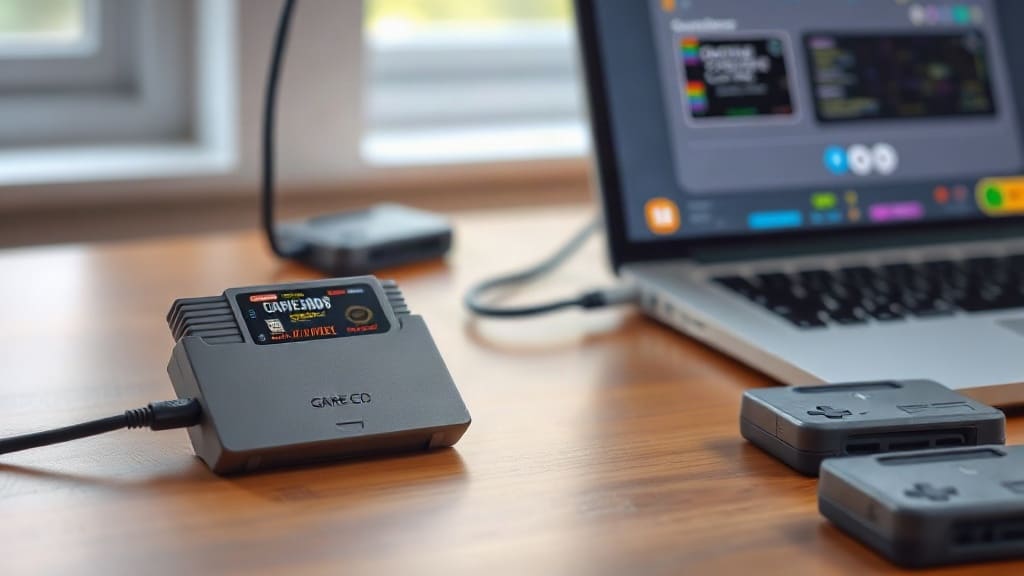
There is a quiet revolution happening in the world of retro gaming, and it is powered by the humble USB-C port. If you have a drawer full of old Nintendo cartridges from the Game Boy, Game Boy Advance, or even the NES era, you might assume they are nothing more than relics. But a new wave of clever gadgets is giving those plastic shells a second life, letting you back up save files, extract ROMs, and even play your original carts on modern devices. This is not just nostalgia; it is practical preservation for a generation of games that are slowly fading away.
The problem is real. Many older cartridges rely on volatile memory or small batteries to hold onto your progress. Those batteries are dying, and when they go, so do the save files. For many of us, that means losing childhood high scores, completed quests, and personal records. But USB-C cartridge readers and adapters are changing that equation. They make it possible to pull data straight from the original hardware and store it safely on your computer or cloud drive. Suddenly, your old games are not trapped anymore.
What Exactly Are These USB-C Cartridge Gadgets?
At their core, these devices are compact readers that connect a classic Nintendo cartridge to a modern computer or smartphone via USB-C. They come in several forms. Some are simple docks that accept a single format, like Game Boy or Game Boy Advance. Others are multi-slot beasts that handle everything from NES and SNES to Nintendo 64 and beyond. Once connected, you can use software to dump the ROM, extract the save file, or even write a new save back to the cartridge. This is a game changer for anyone who wants to preserve their collection or continue a save on emulation.
The most popular models tend to focus on the handheld formats because those cartridges are small and easy to interface with. For example, devices like the GB Operator from Epilogue or the Retrode series have built a loyal following. They plug into a USB-C port, accept the original cartridge, and present it to your computer as a removable drive or through a dedicated app. From there, you can copy files, manage saves, and even play the game directly on your PC using an emulator. It feels almost magical the first time you see it work.
Why USB-C Matters Here
USB-C is more than just a connector; it is a standard that brings power, data, and video through a single cable. For retro gaming gadgets, this means simplicity. You do not need a pile of proprietary cables or a dedicated console. A single USB-C connection to your laptop, tablet, or even some phones is enough to get started. The port is reversible, durable, and fast enough for the relatively small file sizes of classic games. Plus, as USB-C becomes universal, these gadgets are future-proof in a way that older parallel port or FireWire solutions never were.
The Real Benefit: Saving Your Saves
Let us be honest: the most compelling reason to buy one of these gadgets is not to pirate games. It is to protect your personal history. Many cartridges from the Game Boy and Game Boy Advance era use a small coin cell battery to keep the save data alive. Those batteries were designed to last a decade or so, but we are now well past that. When the battery dies, the save is gone unless you have a backup. A USB-C reader lets you pull that save file before it is too late. You can then replace the battery, write the save back, and keep playing for another decade.
This process is straightforward with the right tools. You insert the cartridge, launch the companion software, and choose to back up the save. The software reads the data and saves it as a small file on your computer. If you want to restore it later, you just reverse the process. Some users even move their saves between original hardware and emulators, which opens up a whole new world of cross-platform play. Imagine starting a game on your original Game Boy, continuing it on your phone during a commute, and then finishing it on the console. That is now possible.
Preserving Rare and Expensive Games
Beyond personal saves, these gadgets play a role in game preservation. Some cartridges are now worth hundreds of dollars, and their save data can be just as valuable. Collectors use USB-C readers to document and archive games that might otherwise be lost. This is especially important for prototypes, unreleased titles, or games with limited print runs. By dumping the ROM and save data, the community can ensure that these pieces of gaming history are not forgotten. It is a grassroots effort that complements official preservation projects.
Playing Original Cartridges on Modern Devices
Another exciting use for these gadgets is playing your original cartridges on hardware that was never designed to accept them. With the right adapter, you can plug a Game Boy cart into your PC and play it through an emulator. The emulator reads the ROM directly from the cartridge, so you are using your own physical copy. This is not just a novelty; it means you can enjoy your original games on a big screen with save states, fast forward, and other modern conveniences. For some, this is the best of both worlds: authentic game code with modern quality-of-life features.
Some devices go a step further and let you connect to your phone or tablet. With a USB-C OTG cable, you can turn your Android device into a portable retro gaming station. The companion app handles the emulation, and the cartridge reader supplies the game data. This is incredibly handy for long trips or for anyone who wants to reduce the number of devices they carry. Your entire Game Boy library can fit in a small pouch next to your phone.
Compatibility and Limitations
It is important to note that not every cartridge works with every reader. Some devices only support specific regions or hardware revisions. Others may have trouble with special chips or unusual cartridge designs. Before buying, check the manufacturer's compatibility list. Most reputable makers keep an up-to-date database of tested games. Also, be aware that these devices are primarily for reading and extracting data. Writing save files back is often supported, but writing ROMs is rare and generally discouraged. You should always own the original cartridge you are working with.
Choosing the Right USB-C Cartridge Reader
With several options on the market, picking the right one can feel overwhelming. Here are a few factors to consider:
- Supported formats: Do you need Game Boy, Game Boy Advance, or something else? Some readers handle only one format, while others are multi-cart compatible.
- Software ecosystem: The companion app makes a big difference. Look for software that is regularly updated, easy to use, and available on your operating system.
- Build quality: Since you are inserting and removing cartridges repeatedly, the physical design matters. A sturdy connector and a stable base are important.
- Extra features: Some readers include built-in save management, cheat code support, or even the ability to use original controllers. Decide which features matter to you.
Price is another consideration, but these gadgets are generally affordable. Most fall between thirty and eighty dollars, which is a small investment compared to the cost of replacing lost saves or repurchasing games. For serious collectors, a high-end multi-cart reader can replace several single-format devices and save desk space.
Setting Up Your Reader
Once you have chosen a reader, setup is usually painless. Plug it into a USB-C port, install the companion software, and insert a cartridge. The software should detect the game automatically and offer options to back up the save, dump the ROM, or play. If you run into trouble, most manufacturers have active communities and support forums. Common issues include driver conflicts on Windows or needing to enable USB debugging on Android. A quick search usually resolves these.
The Future of Retro Gaming Preservation
As the original hardware ages, the importance of these USB-C gadgets will only grow. Cartridge batteries will continue to fail, and original consoles will become harder to maintain. But with the ability to extract and back up data, the games themselves can live on indefinitely. This is not about replacing the original experience; it is about safeguarding it for future generations. The fact that these tools are now small, affordable, and USB-C powered means that preservation is accessible to everyone, not just hardcore collectors.
There is also a growing community of developers creating open-source software for these readers. That means you are not locked into a single vendor's ecosystem. You can use community tools to manage saves, convert formats, and even repair corrupted data. This openness is a healthy sign for the retro gaming world. It encourages innovation and ensures that these devices remain useful for years to come.
So if you have been sitting on a pile of old cartridges, now is the time to act. A USB-C cartridge reader is a small investment that can save your childhood memories and open up new ways to enjoy classic games. Whether you are a casual fan or a dedicated collector, these gadgets are worth a look. They prove that even in an age of digital downloads and cloud saves, there is still value in the physical cartridges of the past.
Frequently Asked Questions
Can a USB-C cartridge reader damage my old Nintendo cartridges?
No, when used correctly, these readers are safe. They are designed to read data without modifying the cartridge. However, you should handle cartridges carefully and avoid forcing them into slots. Always follow the manufacturer's instructions to prevent physical damage.
Do I need a special driver to use a USB-C cartridge reader on Windows?
Most modern readers are plug-and-play on Windows 10 and 11. Some may require a driver installation from the manufacturer's website. Check the documentation for your specific model. Mac and Linux users typically have an easier time, as the readers often show up as standard USB devices.
Can I use a USB-C cartridge reader with my iPhone or iPad?
It depends on the reader and the app. Some readers offer iOS support through specific apps, but not all do. Apple's USB-C port on newer iPads and iPhones can power the reader, but software compatibility is the limiting factor. Check the manufacturer's compatibility list before purchasing.
Will these gadgets work with bootleg or reproduction cartridges?
They often do, but there is no guarantee. Reproduction cartridges may use different hardware that is not fully compatible with the reader. Some readers can still dump the ROM, but save extraction might fail. It is best to test with an original cartridge first.
Is it legal to back up my own game cartridges using a USB-C reader?
In many regions, making a backup copy of software you own for personal use is considered fair use. However, laws vary, and distributing ROMs is generally illegal. Always check your local regulations. These devices are intended for personal use and preservation, not for piracy.