
If you run a small print shop or an online apparel business, you already know that efficiency is key to staying profitable. But did you know that a DTF Gangsheet can dramatically reduce your production costs while maintaining high quality? In this article, we'll explore what DTF gangsheets are, how they work, and why they might be the smartest investment for your business.
What Is a DTF Gangsheet?
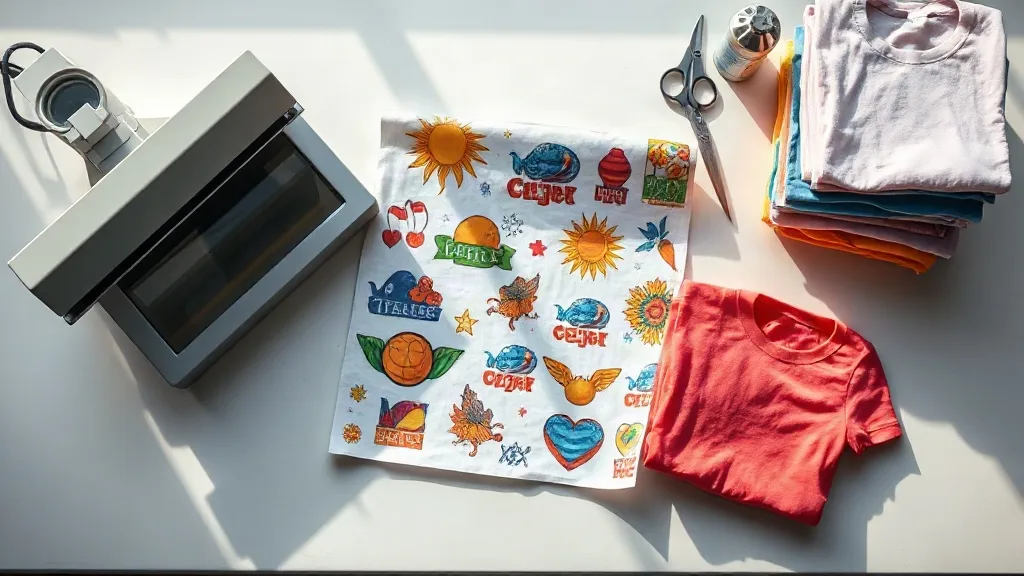
A DTF gangsheet is a single sheet of transfer film that contains multiple designs printed together. Instead of printing each design individually, you arrange them efficiently on a large sheet, maximizing the use of space and reducing waste. This method is part of the direct-to-film (DTF) printing process, where designs are printed onto a special film, coated with adhesive powder, and then heat-pressed onto fabric.
The term "gang" refers to grouping multiple jobs together. So, a gangsheet allows you to gang up several designs on one sheet. This is particularly useful for small businesses that need to produce a variety of items in small quantities.
Why Use a DTF Gangsheet?
There are several compelling reasons to incorporate DTF gangsheets into your workflow. Let's break them down.
Cost Savings
The most obvious benefit is cost reduction. By printing multiple designs on one sheet, you save on film, ink, and powder. The savings can be significant, especially for small orders. For example, if you print 10 different designs individually, you might waste a lot of film on margins and setup. With a gangsheet, you can nestle those designs closely together, using nearly every inch of the film.
Moreover, many DTF suppliers charge by the sheet or by the meter, so consolidating your prints onto fewer sheets directly lowers your material costs. Over time, these savings add up and can improve your profit margins.
Time Efficiency
Printing one sheet with many designs is faster than printing each design separately. You load the printer once, print the entire sheet, and then proceed to powder and cure. This reduces the number of times you need to handle the film, saving labor hours. For a busy shop, time saved translates to more orders processed and higher revenue.
Consistency and Quality
When you print all designs in one batch, you ensure consistent quality across the board. The printer settings, ink coverage, and powder application are uniform for all designs on the sheet. This consistency is crucial if you're producing a set of items that need to look identical, such as team jerseys or promotional merchandise.
Versatility
DTF gangsheets are incredibly versatile. You can mix and match different sizes, colors, and designs on the same sheet. This is perfect for creating sample packs, testing new designs, or fulfilling mixed orders. Whether you're printing small logos for left-chest placement or large back prints, you can fit them all on one gangsheet.
How to Create a DTF Gangsheet
Creating a gangsheet requires some planning and the right tools. Here's a step-by-step guide to help you get started.
Step 1: Gather Your Designs
Collect all the designs you want to print. Ensure they are high resolution (at least 300 DPI) and in the correct color mode (CMYK for DTF). If you're not sure about the file requirements, check with your DTF supplier or printer manufacturer.
Step 2: Use Gangsheet Builder Software
Many DTF suppliers offer free online gangsheet builders. These tools allow you to upload your designs, arrange them on a virtual sheet, and calculate the total length needed. Some popular options include Gangsheet Builder by DTF Transfers and similar tools from other vendors. These builders often have automatic nesting features to maximize space usage.
If you prefer manual arrangement, you can use graphic design software like Adobe Illustrator or Photoshop. Set up a document with the dimensions of your film (e.g., 13 inches wide by however long you need). Place your designs, leaving a small gap between them (about 0.25 inches) to avoid color bleeding.
Step 3: Optimize Placement
Arrange your designs to minimize wasted space. Rotate designs if necessary to fit them into tight spots. Group similar colors together to reduce ink changes if your printer allows. Also, consider the grain of the film; usually, designs should be placed parallel to the film's edge for best results.
Step 4: Print and Finish
Once your gangsheet is ready, print it using your DTF printer. Follow the standard DTF process: print the design, apply adhesive powder, shake off excess, and cure the powder with a heat gun or in an oven. Then, cut out each design and heat-press onto your garments.
Tips for Maximizing Your DTF Gangsheet
To get the most out of your gangsheets, keep these tips in mind.
- Plan ahead: Accumulate several orders before printing to fill the sheet. This reduces waste and saves money.
- Use nesting software: If you're not using a gangsheet builder, consider investing in nesting software to automatically arrange designs efficiently.
- Test print: Before committing to a full sheet, do a small test print to check colors and alignment.
- Label your sheets: If you're printing multiple gangsheets, label them with the order details to avoid confusion.
- Store properly: Keep unused film in a cool, dry place to prevent curling or damage.
Common Mistakes to Avoid
Even experienced printers make mistakes with gangsheets. Here are a few to watch out for.
- Overcrowding: Leaving too little space between designs can cause color bleeding or make cutting difficult.
- Ignoring film grain: Placing designs perpendicular to the film grain can result in poor adhesion.
- Using low-resolution images: Always use high-quality files; otherwise, the prints will look pixelated.
- Forgetting to mirror: DTF prints must be mirrored before printing, or the text will be backwards.
Is a DTF Gangsheet Right for Your Business?
If you frequently print small batches of diverse designs, a gangsheet is likely a game-changer. It's ideal for print-on-demand shops, custom apparel businesses, and even hobbyists who want to save money. However, if you only print large volumes of a single design, individual printing might be more straightforward. Assess your order patterns to decide.
Frequently Asked Questions
What is the maximum size for a DTF gangsheet?
The maximum size depends on your printer's capabilities. Most DTF printers can handle film widths of 13 inches, 17 inches, or 24 inches. The length is limited by the roll size and your printer's settings. Check your printer's specifications for exact limits.
Can I mix different fabric types on one gangsheet?
Yes, DTF transfers work on a wide range of fabrics, including cotton, polyester, and blends. However, you may need to adjust heat press settings for different fabrics. It's best to group items that require similar pressing conditions on the same sheet for efficiency.
How do I calculate the cost savings of using a gangsheet?
To calculate savings, compare the cost of materials (film, ink, powder) for printing designs individually versus on a gangsheet. Typically, you'll use less film and ink per design with a gangsheet. Also consider labor time saved. A simple spreadsheet can help you track these costs.
Do I need special software to create a gangsheet?
Not necessarily. You can use any graphic design software to arrange designs manually. However, dedicated gangsheet builder tools can automate the process and ensure optimal nesting, saving you time and reducing errors.
Are DTF gangsheets suitable for small orders?
Absolutely. In fact, gangsheets are most beneficial for small orders because they allow you to combine multiple small jobs into one economical print run. This makes custom apparel accessible for small businesses and individuals.
By understanding the ins and outs of DTF gangsheets, you can make informed decisions that boost your efficiency and bottom line. Whether you're a seasoned pro or just starting, incorporating gangsheets into your workflow is a smart move.